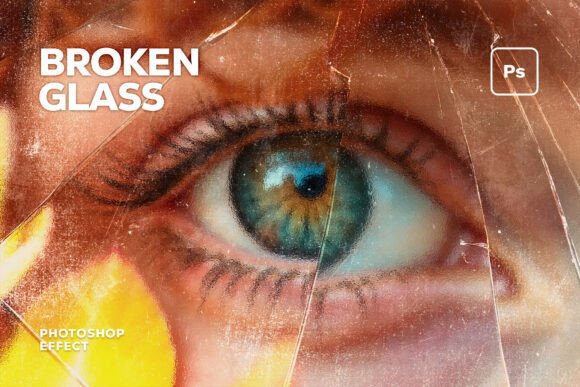
Broken Glass Photo Effect: Transform Your Photography into a High-Tension Visual Narrative
The Broken Glass Photo Effect is more than just a visual enhancement—it's a powerful tool that can elevate your photography to a new level of intensity and drama. Designed for creative professionals and enthusiasts alike, this premium Photoshop toolkit simulates the chaotic beauty of shattered glass with stunning realism. Whether you're working on music album art, cinematic posters, or fashion editorials, the effect adds a layer of tension and complexity that commands attention.
Unlike simple overlays or generic filters, the Broken Glass Photo Effect uses advanced displacement mapping to ensure that each fracture and shard aligns naturally with your image. This means the effect doesn't just look good—it behaves like real glass, shifting and breaking along realistic lines. The result is a high-impact, cinematic atmosphere that can transform any photo into a compelling visual story.
Why People Choose the Broken Glass Photo Effect
Many creators turn to the Broken Glass Photo Effect because it offers a unique way to add depth, texture, and emotion to their work. Its multi-dimensional shards and sharp edges make it ideal for aggressive branding, music art, and editorial designs. For instance, metal and industrial artists often use it to create high-energy covers that reflect the intensity of their sound. Similarly, filmmakers and designers use it to craft dramatic character portraits and movie-style visuals that draw viewers in.
The effect also works well for fashion editorials, where its edgy, avant-garde aesthetic can add an experimental edge to streetwear lookbooks. Social media marketers appreciate its ability to create high-impact Instagram posts that stand out in a crowded feed. And for game developers, it’s a great way to produce action-oriented visuals that feel gritty and immersive.
Common Mistakes When Using the Broken Glass Photo Effect
While the Broken Glass Photo Effect is a powerful tool, many users make mistakes that can undermine its effectiveness. One common error is not understanding the technical requirements. The effect is designed for Adobe Photoshop CC and requires a 3000 x 2000 px resolution at 300 DPI. If you try to use it with lower-resolution images or incompatible software, the results may look pixelated or distorted.
Another mistake is applying the effect without considering the composition of the original image. The broken glass should enhance, not distract from, the subject. If the fractures are too overwhelming or don’t align with the natural flow of the photo, the overall impact can be lost. It’s important to experiment with different placements and adjustments to find the right balance.
Some users also overlook the importance of layered PSD files. The Broken Glass Photo Effect comes as a layered file, which allows for greater flexibility in editing. If you flatten the layers or apply the effect directly to a background, you may lose the ability to tweak individual elements later. Always keep the original layers intact unless you’re certain about the final design.
How to Avoid These Mistakes
To get the most out of the Broken Glass Photo Effect, start by ensuring your workflow is set up correctly. Use Adobe Photoshop CC and work with high-resolution images that match the required dimensions. Before applying the effect, take time to plan how the fractured glass will interact with your subject. Consider the direction of light, the placement of the shards, and how they might reflect or refract the surrounding elements.
When working with layered PSD files, avoid merging or flattening the layers unless necessary. This gives you more control over the final look and makes it easier to adjust specific parts of the effect. Also, test the effect on different types of images to see how it performs in various contexts. A technique that works for a music cover may not be suitable for a fashion editorial, so adapt your approach accordingly.
What to Check Before Using the Broken Glass Photo Effect
Before diving into the Broken Glass Photo Effect, take a moment to evaluate your project’s needs. Ask yourself: What mood am I trying to create? How will the glass fractures complement the subject? Will the effect enhance or overwhelm the image? These questions can help guide your decisions and prevent unnecessary adjustments down the line.
Also, consider the intended platform. If you're using the effect for social media, make sure it scales well across different screen sizes. For print projects, verify that the resolution and color profile meet industry standards. And if you're working with clients, communicate clearly about the capabilities and limitations of the effect to manage expectations effectively.
Realistic Examples and Better Approaches
Imagine you're designing a music album cover for a hard-hitting electronic artist. Instead of applying the broken glass effect uniformly across the entire image, focus on key areas that draw the eye—such as the artist’s face or a central object. This creates a focal point while still maintaining the chaotic energy of the effect.
For a cinematic poster, use the effect to frame the subject within the shattered glass, creating a sense of tension and movement. Experiment with different angles and lighting to highlight the refraction and reflection properties of the glass. This can add a dynamic quality that makes the image more engaging.
In a fashion editorial, integrate the effect subtly by using it as a background element rather than the main focus. This allows the clothing and models to remain the center of attention while still adding an edgy, artistic touch to the composition.
Conclusion: Make Informed Choices for Better Results
The Broken Glass Photo Effect is a versatile and powerful tool that can add a dramatic edge to your work. However, its success depends on how well you understand its capabilities and limitations. By avoiding common mistakes, planning your approach, and checking technical requirements, you can unlock its full potential and create visually striking compositions that resonate with your audience.