Fire Text Effects: Ignite Your Typography with Realistic Combustion
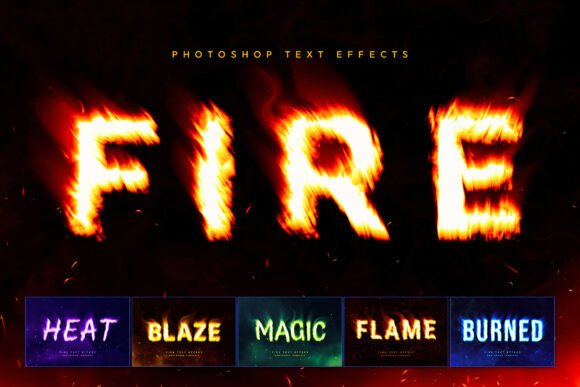
If you're looking to make your text stand out in a world full of digital noise, Fire Text Effects could be the perfect tool for you. This premium Photoshop toolkit transforms any text or logo into a blazing inferno, complete with roaring flames, smoky plumes, and organic flying embers. Whether you're designing for gaming, music, film, or fashion, this effect adds a powerful visual punch that grabs attention and leaves a lasting impression.
Imagine creating a logo for an esports team that looks like it's burning with intensity, or designing a music album cover that pulses with fiery energy. Fire Text Effects makes these possibilities a reality without requiring advanced design skills. The intuitive Smart Object workflow lets you swap in your own fonts or logos in seconds, while the included PSD files handle the complex details like volumetric lighting, heat distortion, and atmospheric smoke overlays.
Real-World Applications for Fire Text Effects
Fire Text Effects isn't just a flashy tool—it's a practical solution for creators across multiple industries. Here are some scenarios where it can make a real difference:
- Gaming Graphics: Streamers and game developers can use fire effects to create aggressive esports logos, team emblems, or video headers that match the high-energy vibe of competitive play.
- Music Album Covers: For rock, metal, or experimental electronic artists, a fiery design can convey raw emotion and power, making their work more visually striking and memorable.
- Movie Event Posters: Action movie trailers, Halloween flyers, or club event posters benefit from bold, dynamic typography that commands attention and sets the tone.
- Streetwear Apparel: Urban fashion brands can incorporate fiery graphics onto t-shirts, hoodies, and accessories, giving their designs a unique, edgy aesthetic that stands out on the street.
- Social Media Content: YouTube thumbnails and Instagram headers with fire effects can increase click-through rates by making content more eye-catching and engaging.
Each of these applications shows how Fire Text Effects can be tailored to specific needs. A musician might use it to enhance their brand identity, while a streamer could use it to create a more immersive viewing experience. The versatility of the tool means it can adapt to different creative goals and industries.
Why Use Fire Text Effects?
For many users, the appeal of Fire Text Effects lies in its ability to deliver professional-grade results quickly. Instead of spending hours trying to simulate realistic fire effects in Photoshop, you can simply plug in your text and let the templates do the heavy lifting. This is especially valuable for small businesses or independent creators who may not have the time or resources to hire a designer.
But it's not just about speed—it's about impact. A well-designed fire effect can elevate the emotional weight of a message. In marketing, for example, a fiery headline can evoke excitement, urgency, or intensity, depending on the context. In entertainment, it can add drama and visual flair that enhances the overall experience.
Another key benefit is the variety of styles included. With six distinct chemical variations—from classic orange embers to mystical green and ethereal blue glows—users can choose the look that best matches their project. This flexibility ensures that Fire Text Effects isn't just a one-size-fits-all solution, but a customizable tool that adapts to different creative visions.
Who Can Benefit from Fire Text Effects?
Fire Text Effects appeals to a wide range of users, from hobbyists to professionals. Here's how different groups might find value in it:
- Entrepreneurs: Business owners looking to create strong visual identities for their brands can use fire effects to differentiate themselves in crowded markets.
- Marketers: Digital marketers can leverage fire effects to create eye-catching social media content, email headers, or promotional materials that stand out in a feed.
- Freelancers: Graphic designers and motion artists can add fire effects to their portfolio, offering clients a unique and dramatic option for their projects.
- Bloggers and Educators: Those creating content for platforms like YouTube or LinkedIn can use fire effects to make their titles and visuals more engaging and shareable.
- Hobbyists: Art enthusiasts or DIY creators can experiment with the tool to bring a new level of creativity to personal projects, such as custom T-shirts or digital art.
Whether you're working on a commercial project or just experimenting with your own ideas, Fire Text Effects offers something valuable. It’s a tool that bridges the gap between simplicity and sophistication, allowing users to achieve professional results without the need for advanced technical skills.
What to Consider Before Using Fire Text Effects
Before diving into Fire Text Effects, it's important to think about your specific needs and goals. Ask yourself: What kind of message do I want to convey? What style will resonate best with my audience? And, most importantly, how will this effect fit into my larger creative vision?
Also, consider the platform where your final design will be used. Fire effects work best in high-resolution formats, so if you're planning to print your work, make sure the templates support that. Additionally, familiarize yourself with the included PDF guide, which provides font links and step-by-step instructions to help you get started smoothly.
Finally, remember that while Fire Text Effects simplifies the process, it still requires some basic understanding of Photoshop. If you're new to the software, take the time to learn the fundamentals before jumping into advanced features. This will help you make the most of the tool and avoid frustration down the line.
Conclusion: Fire Text Effects for Impactful Design
Fire Text Effects is more than just a visual gimmick—it's a practical tool that brings real value to a wide range of creative and professional applications. Whether you're designing for entertainment, marketing, fashion, or personal projects, it offers a quick and effective way to add intensity, drama, and visual interest to your work.